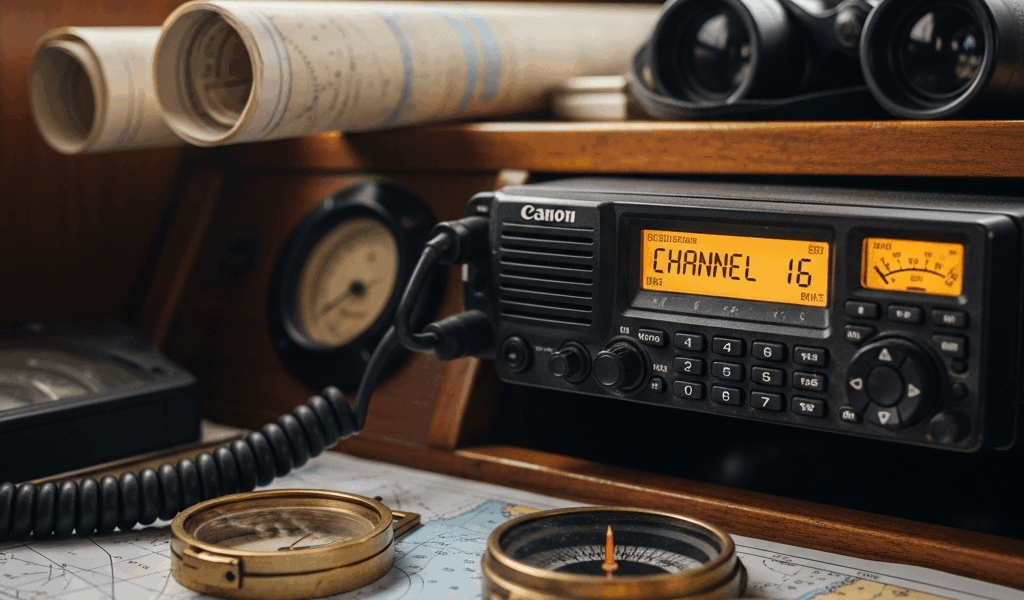
VHF Radio for Boaters — What Every Channel Actually Does
I spent my first summer as a boat owner convinced I’d never need to touch the VHF radio. Then my engine died three miles offshore, and I realized I had no idea which channel to use or what to say. The learning curve hit hard. Now, after five years of coastal cruising and talking to dozens of other boaters, I’ve learned that understanding VHF radio channels isn’t about memorizing a dry reference table—it’s about knowing exactly when to use each one and what happens next.
If you’re shopping for a VHF radio or you’ve inherited one with your boat, you’re probably looking at that channel dial and wondering why there are 88 channels when everyone seems to mention the same five. The truth is simpler than you’d think. Most recreational boaters use maybe eight channels regularly. The rest exist for commercial fishing, military operations, and ship-to-ship traffic you’ll never encounter. But those eight channels? They’ll handle almost every situation you face on the water.
Channel 16 — The One Channel You Must Know
Channel 16 is non-negotiable. It’s the distress and calling channel for VHF radio. Every vessel—commercial, military, and recreational—monitors it. It’s the first place anyone looks when they need help or want to reach another boat. If you own a VHF radio and do nothing else with this article, at least understand Channel 16.
When to Use Channel 16
Use Channel 16 only for three things: distress calls, safety broadcasts, and initial contact with other vessels or shore stations. That’s it. Not for casual chat. Not for weather reports. Not to ask Marina Bob where he’s docked. People will get angry at you, and they have every right to.
A distress call means someone is in immediate danger. Your boat is sinking. You’re disabled with no engine power in shipping lanes. Someone is overboard. Medical emergency. These aren’t “I’m out of fuel at the dock” situations. Those come later.
I once made the mistake of calling Channel 16 because I thought my through-hull fitting was leaking. Turned out to be condensation. But I tied up the channel while a fishing vessel 50 miles south was trying to coordinate with the Coast Guard about a man overboard. That taught me the difference between a problem and a distress. My face was red for weeks.
How to Make a Distress Call
Panicked radio calls don’t help anyone. The Coast Guard and other boaters respond better when you’re clear and methodical, even when you’re terrified. Here’s the structure.
Say “Mayday” three times, slowly. This isn’t Hollywood drama—it’s a phonetic emergency alert that cuts through normal chatter. Then give your vessel name, call sign or boat registration number, your position, and the nature of the emergency. Be specific. “We’re taking on water in the cabin” tells rescuers more than “We need help.” Then shut up and listen.
The Coast Guard will respond. Other boaters might respond. Follow their instructions. They’ll stay with you on Channel 16 until they have you on radar or have another vessel nearby. They might ask you to switch to a working channel—Channel 70 if your radio has DSC (Digital Selective Calling), or another channel they’ll specify. We’ll cover that in a moment.
Using Channel 16 for Initial Contact
If you’re not in distress but need to reach another vessel or a marina, Channel 16 is your starting point. You’ll call them there, exchange names and positions, then switch to an agreed working channel. Never conduct lengthy conversations on Channel 16. You’ll get called out by anyone monitoring.
Here’s how it goes: “This is [your vessel name] calling [other vessel name], Channel 16.” Wait for a response. When they answer, you say something like, “We’re the sailboat off the eastern buoy. Switching to Channel 9.” Then both boats change to Channel 9 and finish your conversation there. Simple. Clean. Respectful to everyone monitoring the emergency channel.
Working Channels — Marina, Bridge, and Weather
Once you’ve made initial contact on Channel 16, working channels are where the real conversation happens. These are the frequencies you’ll actually use most often on the water. Probably should have opened with this section, honestly—it’s where recreational boaters spend 90 percent of their radio time.
Channel 9 — The Recreational Alternative Calling Channel
Channel 9 is the secondary calling channel for recreational boating. It’s less congested than Channel 16, which is why many boaters prefer it for non-emergency calls. Some cruising areas have shifted to using Channel 9 as the primary calling channel to keep Channel 16 clear for genuine emergencies.
Use Channel 9 to hail another recreational boat, to announce your departure from a crowded anchorage, or to coordinate with friends in your flotilla. It’s more relaxed than Channel 16, but maintain the same professionalism. Call, exchange names and positions, agree on a working channel, then switch.
I’ve anchored off Orcas Island six summers running. The local boating community uses Channel 9 to check in when people arrive, to share updates on anchoring conditions, and to organize evening raft-ups. It’s become the social channel for the mooring field—informative without tying up the emergency frequency.
Channel 13 — Bridge-to-Bridge Communication
Channel 13 is mandated by federal law for bridge-to-bridge communication. If you’re approaching a drawbridge, barge, commercial fishing vessel, or any large vessel, you’ll use Channel 13 to coordinate your passage. This is not optional.
When you see a drawbridge ahead, switch to Channel 13 and call the bridge operator with your vessel name and request. “This is the sailboat Starling requesting the Jamestown Bridge. We’re southbound, approximately 500 yards north.” The bridge will either clear you through or ask you to wait. If they ask you to wait, don’t proceed. Wait. It’s that simple and that important.
Container ships and tankers monitor Channel 13. If you’re transiting a shipping lane, especially in narrow channels, the commercial traffic is listening. They appreciate boats that follow protocol. Ignored or wrongly-hailed commercial vessels will broadcast on Channel 13, and their language gets colorful fast.
Weather Channels — NOAA Broadcasts
Channels 1, 2, 3, 4, 5, 6, and 7 are reserved for continuous NOAA Weather Radio broadcasts. Your VHF radio can receive these. You cannot transmit on them. Depending on your location, one of these channels will have continuous marine weather broadcasts every few minutes, updated hourly.
Turn to whichever weather channel is strongest in your area and leave it running in the background while you’re out. You’ll get wind updates, sea state forecasts, small craft advisories, and storm warnings. Most modern VHF radios let you program a weather alert function that sounds a horn if an urgent warning is issued for your area.
My Simrad RS20S radio cost about $300 in 2019. The weather alert feature alone justified it. I was 12 miles offshore when a sudden squall warning aired—15 minutes before the wind shifted from 8 knots to 28 knots with gusts to 35. We headed in immediately. Without that alert, we’d have been caught in confused seas with nowhere near the boat we needed.
Marina and Cruising Channels by Region
Almost every marina monitors a specific VHF channel. It’s usually printed in your cruising guides or marina materials. In the Northeast, many marinas monitor Channel 71. In the Chesapeake, it might be Channel 9 or 68. In Southern California, marinas often use Channel 16 or 9.
Before you arrive at a new marina, find out which channel they monitor. Call them on arrival to request a slip. “This is the sailboat Meridian requesting Shark Bay Marina. We’re inbound and looking for a transient slip.” They’ll direct you to a dock and brief you on water depth, fuel dock procedures, and overnight rates.
Cruising rallies and flotillas use designated channels. The Baja Ha-Ha rally uses Channel 77. Island-hopping convoys pick working channels before departure. Know your local community’s channels. Post them in your cabin where you can see them while at the helm.
What Not to Do on VHF
VHF radio etiquette isn’t arbitrary. It’s enforced by the FCC, and violations can result in fines up to $10,000 and license suspension. But more importantly, bad radio habits put lives at risk by cluttering the frequencies others depend on for safety.
Profanity and Illegal Transmissions
Profanity on VHF is a federal offense. It’s illegal. You will be fined. Beyond the legal issue, every transmission is recorded. Fishing vessels, merchant ships, and Coast Guard stations monitor these frequencies. Language has resulted in $7,500 fines for recreational boaters.
Radio piracy—broadcasting without a license or on unauthorized frequencies—is also illegal. So is impersonating a Coast Guard or marine authority vessel. This isn’t the place for pranks.
Blocking Channel 16
Leaving your radio on Channel 16 while transmitting music, running extended conversations, or making jokes blocks emergency communication. During my first year boating, a group of teenagers on jet skis monopolized Channel 16 for 45 minutes broadcasting pop music. I reported them to the Coast Guard. I never learned what happened to them, but I know the Coast Guard took it seriously.
Test your radio periodically. Most modern radios have a test function that lets you verify transmission without broadcasting. If your radio has this feature, use it. If not, find a quiet time early morning or late evening, switch to a working channel like Channel 9, identify yourself briefly, and confirm transmission. Then stop talking.
Common Etiquette Mistakes
New boaters make predictable mistakes. They run too long on working channels, monopolizing frequency time others need. They fail to use phonetic alphabet for call signs, making themselves unintelligible. They forget to switch off Channel 16 when making non-emergency calls, tying up the emergency frequency.
The phonetic alphabet matters. When you identify yourself, spell out letters that are hard to hear. “Bravo-Yankee-Charlie” instead of “BYC.” This takes five extra seconds but saves confusion and repeated transmissions.
Another mistake: using “radio check” frivolously. “Radio check” means you’re verifying your transmission is being heard. Use it once, get confirmation, then stop. Don’t ask multiple boats for radio checks in sequence.
And don’t ask other boaters for their position unprompted. Privacy matters. If you need to coordinate with another vessel, call them, identify yourself, and explain why you’re calling. They can then decide whether to share their location.
DSC and Your MMSI Number
Digital Selective Calling (DSC) is the modern upgrade to VHF radio. If your VHF is newer than 2010, it likely has DSC capability. This single-button technology can be the difference between a fast rescue and a slow one.
What DSC Does
DSC lets your radio send a digitally formatted distress alert to every DSC-equipped radio in range simultaneously. Instead of broadcasting “Mayday” and hoping someone hears you, your boat’s unique identifier—your MMSI number—is transmitted along with your GPS position, automatically taken from your radio’s GPS antenna or connected chartplotter.
Activated correctly. A Coast Guard station receives your MMSI and coordinates. A nearby fishing vessel receives your coordinates and can head toward you immediately. Commercial shipping gets an alert to avoid your area. It’s faster and more accurate than voice distress calls. It doesn’t replace voice communication, but it enhances it dramatically.
What is an MMSI?
MMSI stands for Maritime Mobile Service Identity.


Stay in the loop
Get the latest nautical soundings updates delivered to your inbox.